7+ Free Online Tax Calculators and Tools

free online tax toolsTax preparation and filing can be a pretty daunting task.  However, online tax preparation and filing solutions can simplify your life tenfold. There are even free online tax calculators and tools for you to use. Everyone can benefit from these tools, while individuals with simple tax situations can calculate and file their taxes easily, quickly and for no cost at all using the tools from the following list:


1. TaxAct

taxact free online tax tool

TaxAct is a free online tax filing solution which allows you to easily prepare, print and e-file tax returns. They guarantee accuracy and provide help and support.


2. TurboTax

turbotax online tool

TurboTax Freedom Edition is a free online federal tax preparation tool. It allows you to prepare and e-file returns for free and to qualify for free state tax filing.

Continue reading >>

Convert Megabytes to Gigabytes online free and more

free online unit converter Do you often need to perform conversions between data storage units? One conversion that is commonly needed is megabytes (MB) to gigabytes (GB), especially when you are evaluating how much space you have on your hard drive. Many times you will need to convert these units when you are looking to download and install software on your personal computer and need to check whether you have enough available disk space.

Let’s say that you would like to download and install a trial version of PDF Converter Elite. If you check out the system requirements for installing and running the software, you will see that you need a minimum of 35MB in available disk space. How many gigabytes is that?

This is very easy to find out. Of course, you can always ask Google, but another handy way is to find a free online unit converter, bookmark the page, and go back to it whenever you need to convert data storage units.

One such converter is PDFConverter.com’s own free online unit converter.

Convert not only your data storage units like bits, kilobytes, nibbles, petabits, and gigabytes, but also units like mass, area, length, pressure, temperatures, volume, angle and even time.

All of the available unit converters are divided into 9 groups for easier access and better organization. Finding the unit converter you need is a breeze thanks to the user-friendly layout.

The conversion process is simple:

free online unit converter
Step 1. First, find the type of units you wish to convert from the nine available categories (mass, data storage, volume, length, etc). For our example, we’ll use “Data storage.

Step 2. In the box provided on top, enter the value that you want to convert. Let’s say you want to convert 35  megabytes into gigabytes. Enter “35” into the box provided.

Step 3. Now, on the left hand side drop-down menu, select the unit you want to convert (Megabyte), and on the right hand side drop-down menu, select the unit that you want it to be converted into (Gigabyte). And that’s it – the converter will display that 35MB is equal to 0.03GB.

free online unit converter
Also, the free unit converter’s simple drag-and-drop feature also allows you to organize the unit converters yourself, according to which ones you use most frequently.

Free Online PDF Converter

PDFConverter.com has not only just launched the all-new and enhanced edition of its flagship software solution PDF Converter Elite, but a new, completely free, online PDF converter as well.

Free Online PDF Conversion allows users to convert PDF documents to Word, Excel and PowerPoint, but also create PDFs online, at no cost at all. Moreover, you can convert as many files as you want, whenever you want.

free online pdf converter

The most notable features include: Continue reading >>

The All-New, More Powerful PDFConverter Elite is here!

PDF converter elite 3Today, PDFConverter.com is pleased to introduce the all-new, redesigned and much improved PDF Converter Elite 3, with a slew of new features and enhancements.

In line with our mission to offer powerful and simple-to-use PDF management solution for all your business  and personal needs, we have completely rebuilt and extended PDFConverter Elite’s capabilities. Here is a quick glimpse into the brand new PCE 3:

Newly designed, more user-friendly interface

PCE 3 boasts a dynamic sidebar which gives its users immediate access to all available conversion options.  Create, convert or modify your PDFs with one click. PCE 3 has a totally new look and feel – it saves you time and makes interaction with the software more intuitive.

Better, faster and more accurate conversions

The quality of the conversion output is much improved thanks to a rebuilt conversion algorithm.

Batch Conversion

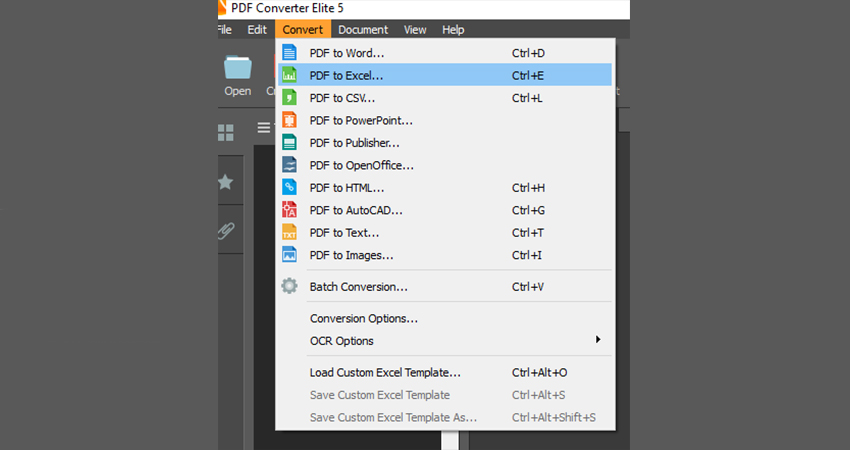
Convert multiple PDFs to Word, Excel, PowerPoint, Publisher, HTML, image, rich or plain text format files easily with the newly introduced batch conversion option. It’s quick, accurate and saves you a lot of time.

New PDF to Publisher Conversion

PDF to Publisher was one of the most asked for conversion options, and PCE 3 now provides it! Moreover, we provided no less than three conversion modes, empowering our users with versatility in creating highly editable .pub or .pubx files from their PDFs.

And much more…

PCE 3 is packed with new features that truly make it the only PDF solution you will ever need. To learn more about the new features, check them out in detail: major improvements in PDF Converter Elite 3.

PCE 3 comes with a free 15-day trial. To download and try it at once, click the link below now:

http://www.pdfconverter.com/downloads/

Convert PDF to Docx Free

The Microsoft Office 2007 and 2010 suites are widely accepted as industry standards and used all over the world, especially by business and professional document creators. MS Word 2007 and 2010 have both become the standard for text processing applications. The default file format for Word 2007 and 2010 is docx. So, whenever you want to create or edit a native, full-featured Word 2010 document, you need to deal with a docx file.

It is also a well-known fact that when we want to send or save business or personal documents, we usually convert them to the PDF format, because of the obvious benefits of PDF.

But many times we need to modify saved or received PDF files. To do that, we need to convert it into an editable Word format, preferably docx. The best way to convert PDF files to the docx format is by using a professional PDF Converter, like Adobe Acrobat or PDFConverter Elite. Most business users who create and convert PDF documents on a regular basis usually opt for a powerful and fast PDF Converter software. However, they are pricey and if you are just a student or need conversion service once in a blue moon, you may prefer a free PDF converter. Provided that you have some extra time and MS Office 2007 or 2010 installed, here is how you can convert your PDFs to docx format completely free of charge with a little help from Google Docs: Continue reading >>

8 Spreadsheet Apps for Android

With the swift rise in mobile technologies and the constant advancements being made, getting work done on the road has never been easier. As smart phones continue to increase in power and popularity, people are now able to do things on their phones that they until very recently needed personal and notebook computers to do.

If you use spreadsheets a lot in your work and need to work with them on the go, there are some great apps available for smart phones, including Android operating system-based phones.

If you are an Android user and someone who needs spreadsheets on a daily basis to boot, here are some great apps to check out. Some are completely free and others are low-priced.


1) Documents to Go  


Documents to go android


An application that puts the power of the Microsoft Office Suite in the palm of your hands, including Microsoft’s Excel program, which is still the industry standard for spreadsheet creation. Continue reading >>

Six Websites to Create Christmas Video Cards Free

christmas greeting cardsChristmas is almost here! Have you already sent out Christmas greeting cards to all your family members, friends and business contacts? Well, if you haven’t, do not despair or stop that wonderful tradition this year just because you think there simply isn’t time anymore (or money for that matter) to buy cards, envelopes, postage stamps and mail them out in time to each recipients’ mailbox before Santa arrives.

We researched and listed six great websites that let you create not just regular Christmas cards, but video Christmas cards. And best of all, they are all free! These websites will not only save you time and money, but will help you preserve trees and send creative, personalized video Christmas wishes.

1) FlixTime is a free online service that converts your photos and videos into a one-of-a-kind and jaw-dropping music video which can make your family’s and friends’ Christmases even merrier! To use this service, sign-up for a free account and then start creating 60-second videos for free. Making videos is a piece of cake: upload photos, videos, choose a tune, and put it all together into a stunning Christmas video card. You can even upload your own music. And if you don’t have any suitable photos, videos or songs, choose some from FlixTime’s stock Media Lounge and music collections. Once you are happy with your creation, share the videos with friends, family or business contacts. Continue reading >>

How to Embed PDFs into Word, Excel and PowerPoint 2010

With the arrival of the Microsoft Office 2010, there have been excellent advances in collaboration and the lines between each of the suite’s programs continue to blur, since they can all be used to benefit one another.

The 2010 Office suite is all about giving the user as many options as possible when creating new documents in any of its programs.

One great thing that you can do in not only Word 2010, but also Excel and PowerPoint, is to include a PDF file in your document.

It’s a very simple process as well.

The process is the same in all three programs: Go to the Insert tab, click Object, and then select Adobe Acrobat Document, which should already be selected anyway.

1) Here is what it looks like in Word 2010:

embed pdf into MS Word 2010


Once the PDF is placed inside the document, the user will be able to resize it and move it around in order to get it looking just right. Continue reading >>

Convert Kindle to PDF Free

kindle to pdfAmazon’s Kindle is one of the most popular and widely used ebook readers and is a great tool for avid readers and book lovers.

Amazon makes it possible to not only read books on your Kindle, but to easily email and convert your PDFs, Microsoft Word documents (both .docx and .doc formats), rich text documents (.rtf), image files (.gif, .bmp, .jpg, .png) and even structured HTML to the Kindle format.

Furthermore, the third generation of Kindle devices supports the PDF file format, so you can easily transfer or email all your business and personal documents to read them comfortably on your Kindle instead of your PC, without having to convert anything.  This saves time, reduces eyestrain and enables you to read on the go.

But what if you need to convert documents from your Kindle to PDF? If you are regularly transferring documents to Kindle, it is not at all uncommon to “misplace” original documents on your PC or simply delete them. If your boss is expecting that report you wanted to review on your Kindle before submitting it, you may need it converted back to PDF fast.

Luckily, there are free software programs that let you easily and quickly convert Kindle books to PDF.  Once converted, documents and books can be viewed on computers and other devices or printed out.

Here are two free eBook converter desktop applications that can help you to convert Kindle format .azw to PDF and much, much more.

Continue reading >>

8 Great Websites to Download Free PDF Travel Guides

free pdf travel guidesAre you preparing to travel this holiday season and discover new places? Do you have a lot of business trips booked for 2012? Maybe you are already looking forward to the summer and planning a great warm-weather getaway. No matter where you plan to travel to, being prepared and knowledgeable about the destination is always important. One of the most useful travel accessories is certainly a knowledgeable and thorough travel guide.

Here are some sites that offer not only fantastic, but also completely free, travel guides that you can download in the convenient PDF format and take with you wherever you need or want to go.


1) Arrival Guides

This site offers well over 400 completely free travel guides that will help you find your way around any city like Barcelona, Cairo, Rio de Janeiro or any country as a whole for that matter. Are you planning a romantic getaway to a beautiful island such as Zakynthos or Bali? There’s a free PDF guide for it! And for skiing fans – find guides for some of the most popular ski resorts in Europe. These guides give you great tips for anything you need, whether you are looking to eat in a nice restaurant, go sightseeing, or have a good time at the hottest bars and clubs.


freepdf travel guides

Continue reading >>